Choose a time
Book a 30-minute onboarding session. Invite the person who owns the process and a technical contact if those are different people.
 Symao Systems
Automation Partner onboarding
After checkout, book a 30-minute onboarding session and tell us about the first workflow. We will confirm hosting, access, and the working plan together.
Your first steps
You do not need a finished specification, technical diagram, or production credentials.
Book a 30-minute onboarding session. Invite the person who owns the process and a technical contact if those are different people.
Tell us what happens today, where the handoff breaks down, which systems are involved, and what a useful result looks like.
Decide whether you want to use an existing n8n environment or a Railway project your company owns. We will confirm the choice during onboarding.
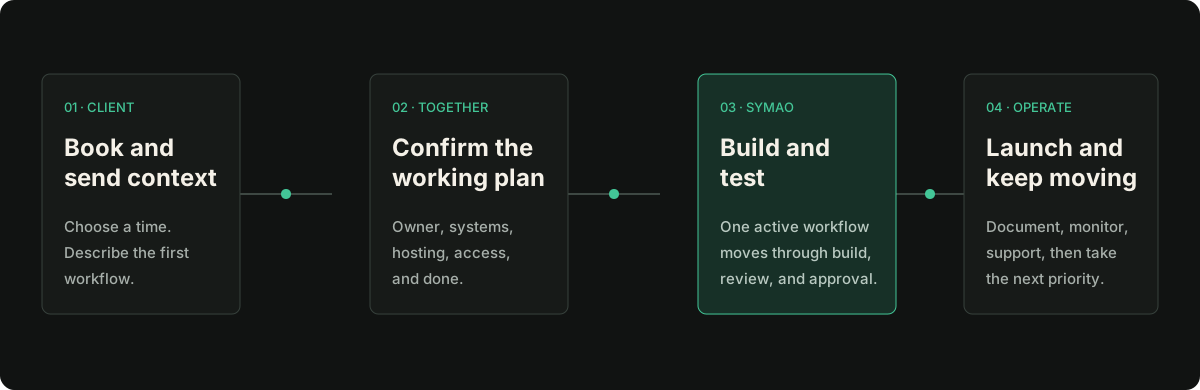
One active workflow moves from a defined request through build, approval, launch, and ongoing care.
Prepare
The goal of onboarding is to leave with a clear first workflow, owner, hosting path, and access plan.
Do not send secrets through the intake form or email. Symao confirms the minimum access needed after the workflow is reviewed.
On the call
Onboarding is a working session, not another sales call.
Agree on the trigger, actions, result, approval points, and test that tell us the workflow is ready.
Confirm the existing n8n environment or the customer-owned Railway setup, including billing and operational ownership.
Identify the minimum accounts and permissions needed. Secrets are entered directly or shared through an approved vault, never plain text.
Symao confirms the active workflow, open questions, client actions, and when the next written update will arrive.
Clear ownership
Symao receives the access needed to build and operate supported workflows. Your company keeps the vendor relationship, billing, data, and final approval authority.
Book onboarding and complete the intake. If something is unclear, email support before sharing credentials or production access.